.svg)
The Zama Confidential Blockchain Protocol enables confidential smart contracts on top of any L1 or L2 using FHE.
Blockchain transparency is a bug, not a feature
Why? Because validators need to see the data to verify the state
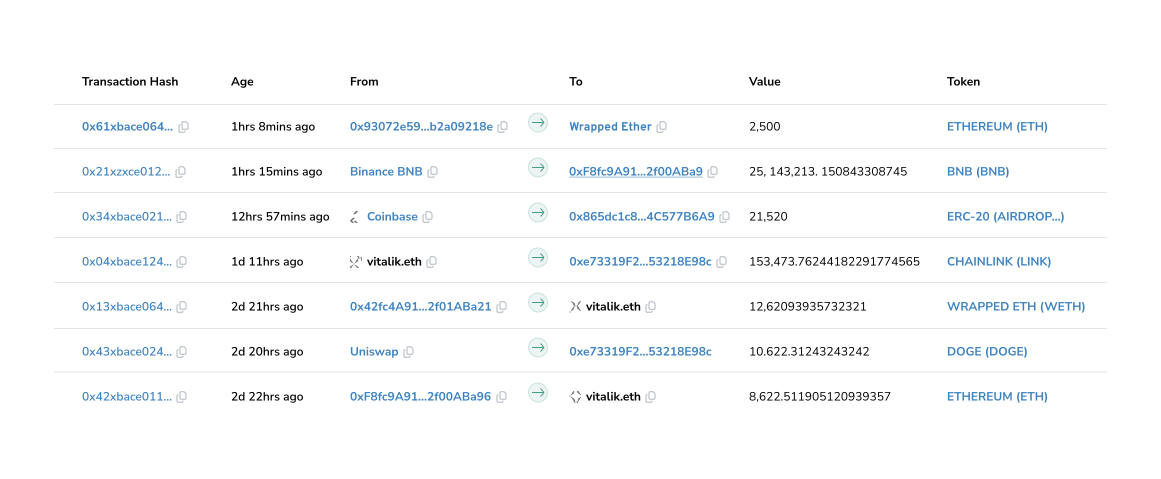
But confidentiality and public verifiability is possible
Powered by Fully Homomorphic Encryption (FHE).
Zama uses FHE to keep onchain data encrypted at all times, even during processing. Not familiar with FHE? Learn more about it here.
Scalable, secure and affordable.
Zama uses coprocessors to offload the FHE computation from the base chain. This keeps gas fees low while enabling horizontal scalability and public verifiability.
Opening a myriad of new use cases for DeFi

DeFi
Confidential token swaps, lending, and yield farming.

Payments
Confidential stablecoin transactions with encrypted amounts

Banking
Onchain self-custodial banking with full confidentiality.

Tokens
Confidential token launches, vesting, airdrops, and governance.

RWA Tokenization
Confidential and compliant RWA to boost institutional adoption.

Sealed-bid auctions
Confidential and fair onchain auctions preventing front-running.
Rating: 3/5 Stars (or your chosen rating)
I recently needed to bypass the FRP (Factory Reset Protection) on a Motorola phone I legitimately own (I forgot my old Google account credentials after a factory reset). After trying several free methods that failed, I purchased/subscribed to [Name of Specific Tool, e.g., "Motorola FRP Unlock Tool v3.2"] .
Here is my honest experience after using it on a [Insert Model, e.g., Moto G Power (2022)] running [Insert Android Version, e.g., Android 11] .
The Good (What Worked):
The Bad (What You Need to Know):
The Ugly (Warnings):
Final Verdict:
This tool is not a polished commercial product; it is a niche utility for technicians or experienced hobbyists. It worked for me once, and that was worth the money to save the phone. However, it is buggy, poorly supported, and requires patience.
Buy this ONLY if:
Avoid if:
Overall: 3/5. It's a blunt instrument that works for common models, but manage your expectations.
Tip for posting: If you are leaving this on a specific software download site (like a forum or tool store), be sure to mention the exact Android version and security patch date of the phone you tested it on. FRP tools fail or succeed based on that detail more than the phone model itself.
The Motorola FRP (Factory Reset Protection) Unlock Tool refers to a category of software designed to bypass the security lock that triggers when a Motorola device is factory reset without first removing the linked Google account. While some users search for an "official" fix, most tools in this space are third-party solutions developed to address a common pain point: being locked out of a perfectly functional device due to forgotten credentials. The Role of Factory Reset Protection
Introduced in Android 5.1, FRP is a security anchor. It ensures that if a phone is stolen and wiped, it remains a "brick" unless the original owner's Gmail login is provided. For Motorola users, this protection is active by default. While effective against theft, it creates significant hurdles for legitimate owners who lose their account access or purchase second-hand phones where the previous owner failed to "clean" the device before selling. Types of Motorola FRP Tools
The ecosystem for unlocking these devices is split into three main approaches:
Manufacturer Tools: Motorola offers software like the Motorola Fix Tool (sometimes called the Rescue and Smart Assistant). While primarily for fixing corrupted software, newer versions in 2026 have integrated more streamlined account management features.
Third-Party Software: Programs like iToolab UnlockGo or 4uKey provide automated "one-click" solutions. These tools often use exploits to trick the phone into thinking the verification has already passed. motorola frp unlock tool
Manual Bypass Methods: These aren't "tools" in the software sense but rather sequences of actions—like accessing hidden settings through the TalkBack feature or keyboard shortcuts—to reach the device’s main settings and disable the lock. Risks and Ethical Considerations
🚨 Warning: The "FRP Tool" market is saturated with risks.
Malware: Many free "cracked" tools found on forums are actually vectors for viruses.
Device Bricking: Using an incompatible tool or an outdated exploit can permanently damage the phone's firmware.
Security Patches: Google and Motorola frequently patch these bypasses. A method that worked on Android 13 may be completely blocked on Android 15.
Imagine this scenario: You’ve just performed a factory reset on your Motorola smartphone—perhaps to fix a software glitch, clear out storage, or prepare the device for sale. You power the phone back on, expecting a fresh start, but instead, you are greeted by an immovable wall: "Verify your account. This device was reset. To continue, sign in with a Google Account that was previously synced on this device."
You freeze. You cannot remember the password. You bought the phone second-hand, and the previous owner is unreachable. You are locked out.
This is called FRP (Factory Reset Protection) . It is a security feature designed by Google to prevent thieves from wiping and reselling stolen phones. But when you are the legitimate owner, FRP feels less like protection and more like a prison sentence. Title: Gets the job done, but with significant
Enter the solution: The Motorola FRP Unlock Tool.
In this 2,500+ word guide, we will dissect everything you need to know about bypassing FRP on Motorola devices. We will cover official methods, free software, paid tools, and step-by-step instructions for every major Motorola model, from the Moto G series to the Edge and Razr lines.
While the story dramatizes the process, the "Motorola FRP Unlock Tool" referenced in the narrative reflects real-world software solutions used by technicians (such as Android ADB FRP Bypass tools, Moto Service Tool, or UnlockTool).
How these tools generally work:
frp partition).The story highlights the dual nature of such software: a necessity for device recovery, but a potential security risk in the wrong hands.
These tools exploit security vulnerabilities in Motorola’s firmware to skip the verification screen.
Our focus in this article: Safe, tested, and widely accepted third-party methods for when you have lost legitimate access.
Compatibility: Motorola devices on Android 8.0, 8.1, & some 9.0 Price: FREE Effectiveness: After a few tries, the tool successfully
For older Motorola phones, you can manually bypass FRP using accessibility features.
C:\FRP_Tool).Making FHE practical for most use cases
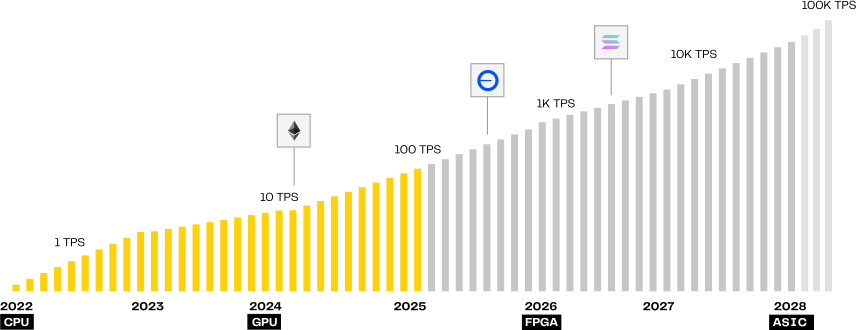
Zama is already faster than Ethereum
Zama can already process 20 tps / chain, enough to run all of Ethereum with FHE, and will reach 1,000 tps next year.
FHE ASICs will enable 10,000+ tps
We're partnering with multiple hardware companies to create dedicated ASICs for FHE, which will enable thousands of tps.
FHE is the holygrail of cryptography
Zama Protocol Roadmap

Zama Newsletter
No spam, ever.