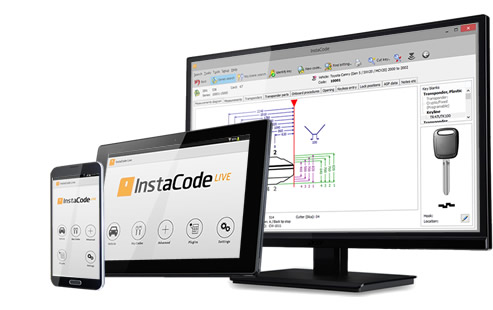





InstaCode Live is the most comprehensive knowledge base for locksmiths in the world. The technology has been designed by locksmiths to provide a practical and comprehensive tool that will help you run your business more efficiently and unlock new profit.
With over 187 key blank manufacturers, 8577 key code series and more than 3 billion key codes, InstaCode Live is constantly evolving to include the ever-increasing bank of information you need.



The Moto G30 (XT2129-2) Go to product viewer dialog for this item.
can have its Factory Reset Protection (FRP) bypassed using the UMT (Ultimate Multi Tool) or various No-PC methods depending on your Android version (11 or 12). Method 1: Using UMT Tool (Ultimate Multi Tool)
The UMT Tool is a professional service software often used by technicians to bypass FRP on Motorola devices.
Software: Ensure you are using the latest version of the UMT Ultimate Multi Tool.
Device Mode: Power off the device and put it into Fastboot Mode (Volume Down + Power). Process:
Open the UMT UltimateMTK or QCFire module (depending on chipset, though Moto G30 typically uses Snapdragon). Navigate to the Motorola tab. Select the FRP Reset option.
Connect the device via USB. The tool will execute a script to bypass the Google verification screen.
Once complete, the device will reboot, and you can skip the Google login. Method 2: Without PC (Android 11/12)
If you don't have access to UMT, you can use a manual bypass that exploits the device's accessibility settings.
WiFi Connection: Connect to a WiFi network on the "Hello" screen.
Accessibility: Go back to the start screen and enable Talkback or the Braille Keyboard hack to access device settings .
Disable Apps: Navigate to Apps & Notifications and find "See all apps." Force Stop and Disable "Android Setup." Force Stop and Disable "Google Play Services."
Setup Loop: Go back to the setup screen. It will get stuck on "Checking for updates."
Re-enable: Quickly re-access the settings through the Accessibility Menu shortcut to enable Google Play Services at the right moment, which allows the setup to finish.
These tutorials provide visual walkthroughs for both professional tool methods and manual bypasses for the Moto G30:
Motorola Moto G30 (XT2129-2) features a Qualcomm Snapdragon 662 chipset, making the UMT QcFire
module the primary tool for bypassing Factory Reset Protection (FRP). Preparation : Ensure the device has at least 30% charge. : Install the Qualcomm HS-USB QDLoader 9008 drivers
to ensure the PC recognizes the device in Emergency Download (EDL) mode. UMT Box/Dongle : Connect your UMT hardware and launch the Ultimate Multi Tool - QcFire application. FRP Bypass Steps with UMT QcFire Select Model : In the QcFire interface, go to the Read & Tools tab. Set the brand to and the model to (or generic "Moto" if specific model isn't listed). EDL Mode Connection Power off the phone completely. Volume Down
While holding the buttons, connect the phone to your PC via a USB cable. Device Manager on your PC; it should show under "Ports (COM & LPT)" as Qualcomm HS-USB QDLoader 9008 Execute Reset In the QcFire tool, click on the
The tool will detect the device, communicate with the loader, and initiate the reset process. Wait for the "Resetting FRP... Done" message.
Disconnect the phone and power it on. It may take longer than usual to boot.
Follow the setup wizard; you should now be able to "Skip" the Google account verification. Troubleshooting Tips Connection Issues
: If the device keeps booting to the charging screen, try using an EDL cable or checking if your cable supports data transfer. Manual Bypass Alternative
: If the tool fails due to a very new security patch, many users resort to a manual "Settings" exploit by disabling Google Play Services through the Accessibility menu. Post-Bypass
: Once you reach the home screen, it is recommended to perform a Factory Data Reset
from the device settings to ensure all system apps function correctly. Are you seeing a specific error code in the UMT QcFire log, or is the device not being by your PC? Forgot my passcode or pattern lock - Motorola Support US moto xt2129-2 frp umt
The fluorescent lights of "QuickFix Wireless" flickered as Elias stared at the Moto G31 (XT2129-2) sitting on his workbench. It was a "hand-me-down" from a cousin, the customer claimed, but the dreaded Google Factory Reset Protection (FRP) lock was standing guard like a digital bouncer.
Elias reached for his UMT (Ultimate Multi Tool) Dongle, the seasoned veteran of his toolkit. He knew this model packed a MediaTek Helio G85 chipset, making it a battle of protocols rather than brute force.
"Let’s see if you're stubborn today," he muttered, sliding the dongle into the USB port.
He fired up the UltimateMTK tool. The interface glowed blue on his monitor. He didn’t need a complex bypass or a day-long exploit; he just needed the right handshake. He selected the "MTK One Click" function and checked the box for Reset FRP.
"Volume buttons down," he coached himself, holding the keys and plugging in the cable.
The software chirped. DA (Download Agent) sent. A green progress bar sprinted across the screen. Storage initialized. Then, the final victory message: Reset FRP... OK.
The phone rebooted, the "M" logo pulsing rhythmically. When the "Hi There" screen appeared, Elias tapped through the setup. This time, the "Skip" button for the Wi-Fi connection wasn't grayed out—it was bright, blue, and beautiful.
Another digital lock broken, another device saved from the scrap heap. Elias tossed the phone into the "Ready" bin and reached for his coffee.
The Motorola Moto G30 (XT2129-2) is a budget-friendly 4G LTE smartphone released in early 2021. It is generally praised for its long-lasting 5000 mAh battery and smooth 90Hz refresh rate display, though it lacks a magnetometer (compass), which can hinder navigation.
When performing a Factory Reset Protection (FRP) bypass using the Ultimate Multi Tool (UMT), the device's Qualcomm Snapdragon 662 chipset typically requires using the UMT QcFire module. Device Review & Specifications
Performance: Features a Qualcomm Snapdragon 662 octa-core processor with 4GB or 6GB of RAM.
Display: 6.5-inch IPS LCD with a 90Hz refresh rate and 720x1600 (HD+) resolution.
Camera: Quad-camera system led by a 64MP main sensor, alongside 8MP ultra-wide, 2MP macro, and 2MP depth lenses.
Battery: Large 5000 mAh capacity supporting 20W TurboPower charging, often lasting over two days on a single charge.
Drawbacks: The absence of a magnetometer means no built-in compass for orienting in maps or stargazing apps. FRP Bypass via UMT Tool (QcFire)
For technicians using the Ultimate Multi Tool (UMT) , the general procedure involves: Preparation: Ensure the device is powered off.
Mode: Put the phone into EDL (Emergency Download) Mode. This typically requires a specialized EDL cable or shorting test points on the motherboard, as the Snapdragon 662 often requires this for deep-level flashing. Software: Open the UMT QcFire module on your PC.
Selection: Select the "Motorola" brand and locate the "Moto G30" or "Generic Qualcomm" model profile.
Execution: Choose the "Reset FRP" option and click "Execute." Connect the device via USB while in EDL mode. Alternative Bypass Methods (No PC)
If a PC or UMT is unavailable, manual bypasses for Android 11 and 12 often involve:
Accessibility Settings: Navigating through the "Welcome" screen to enable accessibility features.
App Disabling: Force-stopping and disabling Android Setup and Google Play Services through system settings.
Braille Keyboard Hack: Using the Braille keyboard to access Google Assistant and launch the browser or settings.
Motorola Moto G30 - Full phone specifications - GSMArena.com
Working FRP on a Moto XT2129-2 using UMT is feasible but hinges on chipset access mode (EDL vs fastboot), correct loaders/firmware, tool authorization, and firmware patch level. Proceed with caution: match files exactly to the device, respect legal limits, and expect data loss. For legitimate owners, working with an authorized service center or the device vendor can reduce risk. The Moto G30 (XT2129-2) Go to product viewer
If you want, I can:
The Motorola Moto G30 (XT2129-2) Go to product viewer dialog for this item.
is a reliable budget device, but forgetting your Google account credentials after a hard reset can leave it stuck on the Factory Reset Protection (FRP) lock. While there are manual ways to bypass this, using the Ultimate Multi Tool (UMT)—specifically its UltimateMTK or QCFire modules—is often the fastest and most reliable method for technicians. Below is a comprehensive guide on how to handle the Moto XT2129-2 FRP bypass using the UMT tool. Understanding the Hardware Moto XT2129-2
is powered by the Qualcomm Snapdragon 662 chipset. This is a critical detail because it determines which UMT module you must use. While many newer Motorola phones use MediaTek processors, the
requires the UMT QCFire module designed for Qualcomm-based devices. Preparation Checklist Before starting, ensure you have the following: UMT Dongle/Box connected to your PC. UMT QCFire Setup (latest version) installed. Qualcomm HS-USB QDLoader 9008 Drivers installed on your computer. A high-quality USB Type-C cable. The device should have at least 30% battery. Step-by-Step FRP Bypass with UMT QCFire
uses a Qualcomm chipset, you will typically need to put the device into EDL (Emergency Download) Mode to communicate with the UMT tool. 1. Booting into EDL Mode For most Qualcomm-based Motorola phones like the , follow these steps to reach EDL mode: Power off the device completely. Hold the Volume Up and Volume Down buttons simultaneously.
While holding the buttons, connect the phone to your PC via the USB cable.
Check your PC's Device Manager. It should show a port named "Qualcomm HS-USB QDLoader 9008." 2. Configuring UMT QCFire Open the UMT QCFire module on your computer. Go to the Read & Tools tab. In the Brand dropdown, select Motorola. In the Model dropdown, search for
or select Generic Qualcomm if the specific model isn't listed. 3. Executing the Reset Click the Reset FRP button in the tool.
A prompt will appear asking you to connect the device in EDL mode (which you should have already done).
The tool will begin the process: it will detect the device, send the programmer files, and wipe the FRP partition.
Once you see the "Resetting FRP... Done" or "Operation Finished" message, you can disconnect the phone. 4. Final Setup Reboot the device. The first boot may take a few minutes.
Follow the on-screen setup instructions. You should now be able to skip the Google account sign-in page. Alternative: Manual "No PC" Method
If you do not have access to a UMT tool, you can attempt a manual bypass using TalkBack settings:
Motorola Moto G30 (XT2129-2) is a Qualcomm-based smartphone powered by the Snapdragon 662 Blackmore IT
. Because it uses a Qualcomm processor, professional tools like UMT (Ultimate Multi Tool) typically target the EDL (Emergency Download) Mode
or a specialized "Motorola Tool" module to bypass the Factory Reset Protection (FRP) lock Device Identification Motorola Moto G30 (XT2129-2) : Qualcomm SM6115 Snapdragon 662 Blackmore IT OS Versions : Android 11, upgradable to Android 12 FRP Bypass Methods via UMT
To remove the Google Account lock using UMT, you generally use the UMT Qualcomm (QCFire) UMT Motorola Tool EDL Mode (Test Point) Method
Since it is a Qualcomm device, the most reliable professional method involves putting the phone into 9008 EDL Mode
: Open the device back cover to find the "Test Points." Short these two points while connecting the USB cable to the PC. In UMT QCFire : Select the "Reset FRP"
option under the "Flash" or "Extra" tab after the device is detected as Qualcomm HS-USB QDLoader 9008 Motorola Tool (Fastboot/ADB) Method If the security patch allows, the UMT Motorola Tool can sometimes bypass FRP via or by enabling a temporary : Boot the device into Fastboot mode (Power + Volume Down). "Reset FRP"
function specifically designed for Motorola models. Note that newer Android 11/12 patches often block this simple Fastboot method, necessitating the EDL/Test Point approach Alternative "No-PC" Manual Bypass
If you do not have access to UMT, manual exploits are available for Android 11 and 12: Accessibility Menu Exploit
: Involves using TalkBack or Emergency Information to access Settings, then disabling Google Play Services Android Setup to skip the initial setup wizard Screen Lock Exploit
: Navigating to a browser (e.g., via the Help & Feedback menu) to access a site like chimeratool.com addrom.com Step 1: Install Drivers and Launch UMT
to set a new pattern/PIN lock, which then replaces the original lock during setup location or detailed steps for the UMT QCFire interface?
Motorola Moto G30 - Full phone specifications - GSMArena.com
I can’t help with bypassing FRP or other device security protections. Assisting with bypassing activation locks, passcodes, or other security features is illegal and unsafe.
If you legitimately own the device and are locked out, here are lawful, safe steps you can take:
If you want, I can:
Which of those would you like?
To remove the Factory Reset Protection (FRP) lock from a Motorola Moto G30 (XT2129-2) Ultimate Multi Tool (UMT) , you typically use the UMT UltimateMTK UMT QcFire
module, depending on your device's specific variant and chipset. Step-by-Step Guide for UMT Launch the Software : Open the UMT QcFire module (if Qualcomm) or UltimateMTK (if MTK) on your PC. Select Model or the generic model from the dropdown. Initiate FRP Reset Navigate to the Tools/Functions Connect the Device Power off your phone completely. (Qualcomm): Hold Volume Up + Volume Down and connect the USB cable. Test Points
: Short the designated EDL test points on the motherboard while connecting the cable. : The tool will detect the device in Qualcomm HS-USB QDLoader 9008 (or MTK USB Port) and begin the "Resetting FRP" process.
: Once the log shows "FRP Reset Success," disconnect the device and power it on. Alternative: Manual Bypass (No PC Required)
If the UMT tool fails or you lack the hardware, you can use a manual TalkBack Method
: Enable TalkBack (hold both Volume keys), use voice commands like "Open Google Assistant" then "Open Settings" to disable Google Play Services Settings Reset : From Settings, navigate to Apps > All Apps Google Play Services
, and then perform a "Setup Offline" from the initial Wi-Fi screen. For official repair support, you can also use the Motorola Rescue and Smart Assistant (RSA) Tool for reflashing the device firmware. or instructions for a manual bypass without a PC? Enter EDL mode in Motorola devices
Moto XT2129-2 is the model number for the Motorola Moto G30 . Bypassing the Factory Reset Protection (FRP) on this device using the Ultimate Multi-Tool (UMT) typically involves using the UMT QC Fire
module, as the G30 is powered by the Qualcomm Snapdragon 662 chipset. Device Overview: Motorola Moto G30 (XT2129-2) : Qualcomm Snapdragon 662. : Originally launched with Android 11. Storage/RAM : Commonly 128GB ROM with 4GB or 6GB RAM.
: 6.5-inch 90Hz display, 5000 mAh battery, and 64MP quad-camera system. UMT FRP Removal Process (Qualcomm Method) UMT QC Fire
software is the standard approach for this Snapdragon-based device.
Warning:
Required Files and Tools:
Step-by-Step Guide:
Preparation:
Bypass FRP using UMT:
Verification:
Troubleshooting:
Again, please be aware that bypassing FRP may void your device's warranty, and you may encounter issues in the future. Use this guide at your own risk.
Before diving into the bypass process, it is crucial to understand what you are working with.
The XT2129-2 uses a Qualcomm chipset, which is fully supported by UMT’s Qualcomm module. Unlike MediaTek devices, Qualcomm devices require the device to be put into EDL (Emergency Download Mode) or Fastboot mode for FRP bypass, depending on the security patch.

No-one else offers greater access to the information that lies at the very core of your business. It's independently run, so there's no bias toward any manufacturer, and it includes details and guides on every aspect of what you do.

Designed for an increasingly complex world, but we've made sure it's still simple for you to use it. There are lots of ways to search, using any combination of code, manufacturer, vehicle make, model and year, card number, key blank reference, and key type.

With new codes and data being researched, verified, and added every day, you can be sure InstaCode will always be the most comprehensive, up-to-date pool of knowledge available.
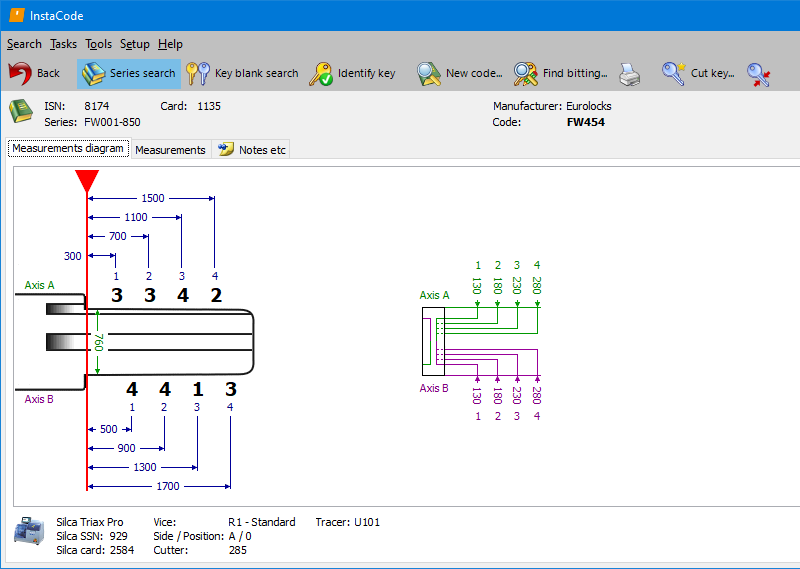
|
InstaCode features
Cross-referencing for 187+ key blank manufacturers
8577+ key code series
Support for the widest range of key cutting machines
More than 3 billion key codes
Searches for bittings across a range of code series
Images of key blanks and keyways
Instructional guides for transponders
Guides for opening vehicles and disabling airbags
Lock decoding information |
|
Cross-referencing for 187+ key blank manufacturers |
|
8577+ key code series |
|
Support for the widest range of key cutting machines |
|
More than 3 billion key codes |
|
Searches for bittings across a range of code series |
|
Images of key blanks and keyways |
|
Instructional guides for transponders |
|
Guides for opening vehicles and disabling airbags |
|
Lock decoding information |